Showing posts with label BPEL. Show all posts

Sunday, January 6, 2013

BPEL to OSB Transaction Propagation using SB Transport

How do we propagate the transaction from BPEL to OSB.

I am trying here a special use case


Ø  Place Message in the source queue

Ø  BPEL process consumes the message

Ø  BPEL then invokes a OSB proxy service

Ø  OSB proxy service invokes an OSB business service

Ø  OSB business service post the message to an outbound queue

If any error happens in the OSB layer, the transaction should roll back and the message has to be redelivered till the redelivery limit specified for the message. After the redelivery limit is reached the message should be stored in an error queue


Step 1

Create the following three queues in the weblogic domain

 1) MyDistributedQueue
 2) ErrorQueue
 3) TestOutQueue


Open MyDistiburedQueue and go to the tab "DeliveryFailure" and configure the ErrorQueue


Lets first do a positive test

1) Create BPEL Consumer Process which consumes message from the MyDistributedQueue
2) Create an OSB proxy service using SB Transport
3)OSB proxy then calls the OSB business service , which inturn send the message to the target queue.
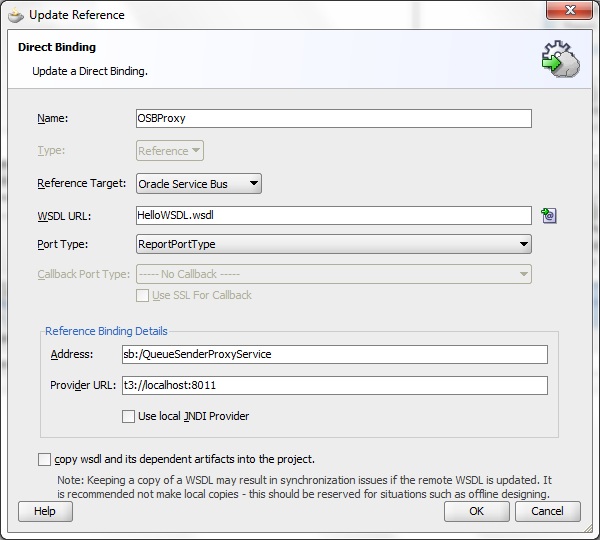
4) Since SB Transport is used we need to use DirectBinding option from BPEL to call the OSB proxy service

OSB Proxy Service using SB Transport


OSB business service configuration


BEPL Process which consumes message from the source queue and calls the OSB Proxy Service


BPEL uses Direct Binding to invoke OSB ProxyService which uses SB Transport


Now post a message to the source queue

There is no error anywhere in the service and  BPEL consumes the message and send to OSB sucessfully


We can see the message in the target queue


Now lets simulate an error in the OSB Layer. Instead of an actual endpoint URI , change it to a wrong end point

Again post a message to the source queue


Now we can see the exceptions in the OSB logs


Now the transaction rolls back and the message is getting redelivered 3 times

Now in the target queue there wont be any message
Where as the message will be visible in the error queue configured for the source queue after the redelivery limit is reached
So by this approach the message is preserved in the error queue irrespective of  the error happened in BPEL layer or OSB layer

Friday, December 21, 2012

JMS Message Retry in BPEL

Reliability is one of the key features in integration scenario. Customer never wants to hear that application failed to process the message and it is even worst when application lost the message.

 Consider a typical scenario where client posts a message to queue and BPEL is consuming the message from the queue. If any failure happens in the BPEL the message should be rolled back to the original JMS Queue and should retry after some delay. If the retry limit is reached then the message should be moved to the ErrorQueue. Later the failed messages can be retrieved from the error queue and can be reprocessed. Ultimately this helps to preserve the customer data and shows the applications reliability.

Lets create a queue, error queue and connection factory as shown below


 For the MyDistributedQueue configure the error queue as follows


 Goto Deployments->jmsAdapter->configuration->OutboundConnectionPool

 Create a new connection pool  and specifying the connection factory which we created in the first step


Set the acknowledgement mode as client_ack


Create a BPEL process with a JMSAdapter for consuming the message from the queue


Also its important to set the oneWayDeliveryPolicy to sync in the composite.xml


Now in the BPEL process add an throw activity with rollback exception/system exception


Deploy the process and post a message in the MyDistributedQueue

Set the ReDeliveryLimit to 5 while posting the message


Now watch the emconsole , we can see 6 instances of the process getting created as the redelivery limit value was set as 5


After 5 retries the message will be redirected to the ErrorQueue.

Now if we watch the MyDistributeQueue, the message wont be available there.


Now check the error queue, we can see the message over there


Select the queue and go to show message. we can see the original message


Monday, November 12, 2012

List all the deployed composites

It will be handy if we have a script to list all the deployed composites belong to a partition. Here is a sample

Step1:

Create a property file as follows

=============Env.properties====================


url=t3://localhost:7001
server=localhost
port=8001
username=weblogic
password=weblogic1
PARTITIONS=default,masterdata,marketing


============end of Env.properties==================

Step 2 :

Create the following python script

=================ListDeployedComposites.py=========

from java.io import FileInputStream

try:
propInputStream = FileInputStream("D:\\tech\\wlst\\Env.properties")
configProps = Properties()
configProps.load(propInputStream)
except NameError, e:
print 'EXCEPTION OCCURED'
print 'Please check there is: ', sys.exc_info()[0], sys.exc_info()[1]
else:
print 'properties loaded properly'
print 'configProps',configProps
url = configProps.get("url")
print 'url=', url
server = configProps.get("server")
print 'server=', server
port = configProps.get("port")
print 'port=', port
username = configProps.get("username")
print 'username=', username
password = configProps.get("password")
print 'password = ', password

partitions = configProps.get("PARTITIONS")
print 'partitions = ', partitions


print '========================'
partitionList = partitions.split(",")
count = 0
for i in partitionList:
try:
sca_listCompositesInPartition(server,port,username,password,partitionList[count])
except NameError, e:
print 'EXCEPTION OCCURED'
print "Please check there is: ", sys.exc_info()[0], sys.exc_info()[1]
count = count+1

============= end of ListDeployedComposites.py==========

Step 3:
Start the wlst command as follows
D:\Oracle\Middleware\Oracle_SOA1\common\bin>wlst.cmd
Run the script from wlst prompt as follows
wls:/offline> execfile('D:\\tech\wlst\\ListDeployedComposites.py')

Result:

Following 21 composites are currently deployed to the platform, in partition: default.

1. AIAB2BInterface[1.0], partition=default, mode=active, state=on, isDefault=true, deployedTime=2012-06-08T09:03:08.211Z
2. ProductionRecipeResponseEBS[1.0], partition=default, mode=active, state=on, isDefault=true, deployedTime=2012-10-10T09:59:04.233Z
3. SyncProductionRecipeListEbizProvABCSImpl[1.0], partition=default, mode=active, state=on, isDefault=true, deployedTime=2012-10-10T
4. SyncSpecPLM4PAdapter[1.0], partition=default, mode=active, state=on, isDefault=true, deployedTime=2012-10-10T09:54:10.927Z
5. SyncRecipeListEbizAdapter[1.0], partition=default, mode=active, state=on, isDefault=true, deployedTime=2012-10-10T09:59:49.244Z
6. SyncItemListEbizProvABCSImpl[1.0], partition=default, mode=active, state=on, isDefault=true, deployedTime=2012-10-10T10:03:57.380
7. ItemResponseEBSV2[1.0], partition=default, mode=active, state=on, isDefault=true, deployedTime=2012-10-10T09:57:59.963Z
8. TransformAppContextEbizService[1.0], partition=default, mode=active, state=on, isDefault=true, deployedTime=2012-10-10T10:00:21.9
9. SyncItemListEbizAdapter[1.0], partition=default, mode=active, state=on, isDefault=true, deployedTime=2012-10-10T09:59:28.608Z
10. ProductionRecipeEBS[1.0], partition=default, mode=active, state=on, isDefault=true, deployedTime=2012-10-10T09:58:45.184Z
11. AgToAGPollingTest[1.0], partition=default, mode=active, state=off, isDefault=true, deployedTime=2012-08-09T11:48:04.849Z
12. SimpleApproval[1.0], partition=default, mode=active, state=on, isDefault=true, deployedTime=2012-05-21T15:51:27.432+05:30
13. AIAErrorTaskAdministrationProcess[1.0], partition=default, mode=active, state=on, isDefault=true, deployedTime=2012-06-08T08:53:
14. AIAB2BErrorHandlerInterface[1.0], partition=default, mode=active, state=on, isDefault=true, deployedTime=2012-06-08T09:04:31.440
15. SampleCursorRef[1.0], partition=default, mode=retired, state=on, isDefault=true, deployedTime=2012-11-02T16:00:17.268+05:30
16. AIAReadJMSNotificationProcess[1.0], partition=default, mode=active, state=on, isDefault=true, deployedTime=2012-06-08T09:00:29.4
17. FirstBPEL[1.0], partition=default, mode=active, state=on, isDefault=true, deployedTime=2012-11-09T21:26:47.672+05:30
18. ReloadProcess[1.0], partition=default, mode=retired, state=on, isDefault=true, deployedTime=2012-06-08T09:02:14.366Z
19. AIAAsyncErrorHandlingBPELProcess[1.0], partition=default, mode=active, state=on, isDefault=true, deployedTime=2012-06-08T09:01:2
20. QueryResponsibilityEbizAdapter[1.0], partition=default, mode=active, state=on, isDefault=true, deployedTime=2012-10-10T09:52:36.
21. SyncSpecPLM4PReqABCSImpl[1.0], partition=default, mode=active, state=on, isDefault=true, deployedTime=2012-10-10T10:02:53.116Z


start/stop/activate/retire composites using wlst

Here is a script for doing the state change for a deployed composite. This is a generic python script which will cater the requirement for start/stop/retire/activate any number of composites at a time

Step1 :
Create a property file, specify the server connection details, the list of composites and the action required on them

========= composite.properties ==================

url=t3://localhost:7001
host=localhost
port=8001
username=weblogic
password=weblogic1

COMPOSITES=default/SampleCursorRef/1.0,default/ReloadProcess/1.0
operation=retire

========== end of composite.properties =============

Step 2 :
Create the following python script

=================StateChange.py===============
from java.io import FileInputStream
propInputStream = FileInputStream("D:\\tech\\wlst\\composite.properties")
configProps = Properties()
configProps.load(propInputStream)
url = configProps.get("url")
print 'url=', url
host = configProps.get("host")
print 'host=', host
port = configProps.get("port")
print 'port=', port
username = configProps.get("username")
print 'username=', username
password = configProps.get("password")
print 'password = ', password
operation = configProps.get("operation")
print 'operation = ', operation

print '========================'
print 'host=', host
COMPOSITES = configProps.get("COMPOSITES")
print 'COMPOSITES = ', COMPOSITES
print 'host=', host
compositeList=COMPOSITES.split(',')
print compositeList[1]
count = 0
for i in compositeList:
   compositeProps = compositeList[count].split("/")
   partition = compositeProps[0]
   compoisteName = compositeProps[1]
   version = compositeProps[2]
   print 'partition ..',partition
   print 'newPartition..',newPartition
   print 'compoisteName ..',compoisteName
   print 'version ..',version
   print '========================'
   
   print 'trying to  ',operation ,'the', compoisteName
   try:
if operation=='start':
sca_startComposite(host, port, username, password, compoisteName, version)
elif operation=='stop':
sca_stopComposite(host, port, username, password, compoisteName, version)
elif operation=='activate':
sca_activateComposite(host, port, username, password, compoisteName, version)
elif operation=='retire':
sca_retireComposite(host, port, username, password, compoisteName, version)
else:
   print '=======DO NOTHING ========='
   except NameError, e:
print 'EXCEPTION OCCURED'
print "Please check there is: ", sys.exc_info()[0], sys.exc_info()[1]
   else:
print 'Completed the action on ',compoisteName
   count = count+1
=================end of StateChange.py============

Step3: Open a command promt and start the wslt command from D:\Oracle\Middleware\Oracle_SOA1\common\bin as follows  

D:\Oracle\Middleware\Oracle_SOA1\common\bin>wlst.cmd

This will start the wslt engine . Now execute the python script from the wlst prompt as follows
wls:/offline> execfile('D:\\tech\wlst\\StateChange.py')

To do start/stop/activate change the value for operation in the composite.properties file

Sample result
===================== 
trying to   retire the ReloadProcess
host = localhost
port = 8001
user = weblogic
partition = default
compositeName = ReloadProcess
revision = 1.0
label =  None
compositeDN =default/ReloadProcess!1.0
Connecting to: service:jmx:t3://localhost:8001/jndi/weblo
Composite (default/ReloadProcess!1.0) is successfully ret
Completed the action on  ReloadProcess
=======================================


Friday, November 9, 2012

Securing OSB proxy service

Security is an important aspect in the webservice domain. Let us see how to secure an OSB proxy service using OWSM

Create a OWSM enabled osb domain


Create a proxy service. Add the security policy as shown below

Enable the Header Processing as below

Save and Activate the changes in the osb console.

Now test the service from Test Console without passing the SOAP Header

It will throw an error as shown below

The service cannot be invoked without passing user credentials as part of SOAP Header.


Now lets see how to invoke this secured service from BPEL 

Create a partner link for the above OSB service in the BPEL.

In the composite.xml design view select the partnerlink

Right click on the partner link and select the Configure WS Policies option

Choose the wss_username_token_client_policy for the Security field

In the property inspector window, go to binding property section and click on the add button.


Add two new properties for username and password with appropriate values for the properties

Now the composite.xml will appear like as shown below. 


Deploy and test the BPEL. Now this BPEL will successfully invoke the secured OSB proxy service


Sunday, October 14, 2012

Extract all your service end points using a java utility

Often we may find a need for publishing the endpoints of all your service to a new client. Instead of getting the end points for each and every service from em console a java class would do that job quickly.


Code
================

package test;

import java.util.Hashtable;
import java.util.UUID;
import java.util.List;

import javax.naming.Context;

import oracle.soa.management.facade.Locator;
import oracle.soa.management.facade.LocatorFactory;
import oracle.soa.management.facade.Composite;
import oracle.soa.management.facade.Service;
import oracle.soa.management.facade.CompositeInstance;
import oracle.soa.management.facade.ComponentInstance;


import oracle.fabric.common.NormalizedMessage;
import oracle.fabric.common.NormalizedMessageImpl;

import oracle.soa.management.util.CompositeInstanceFilter;
import oracle.soa.management.util.ComponentInstanceFilter;


import java.util.Map;

import javax.xml.transform.*;
import javax.xml.transform.dom.*;
import javax.xml.transform.stream.*;
import org.w3c.dom.Element;
import java.io.*;

import oracle.soa.management.CompositeDN;
import oracle.soa.management.facade.Component;


public class EndpointLister {
    public EndpointLister() {
        super();

        Hashtable jndiProps = new Hashtable();
        jndiProps.put(Context.PROVIDER_URL, "t3://localhost:8001/soa-infra");
        jndiProps.put(Context.INITIAL_CONTEXT_FACTORY,"weblogic.jndi.WLInitialContextFactory");
        jndiProps.put(Context.SECURITY_PRINCIPAL, "weblogic");
        jndiProps.put(Context.SECURITY_CREDENTIALS, "weblogic1");
        jndiProps.put("dedicated.connection", "true");


        Locator locator = null;
        try {
            // connect to the soa server
            locator = LocatorFactory.createLocator(jndiProps);

            // find composite
            List composite = locator.listComposites();
         
            for(int i=0;i<composite.size();i++){
           
              CompositeDN lCompositeDN = (CompositeDN)composite.get(i);
              Composite lComposite = locator.lookupComposite(lCompositeDN);
              List lServices = lComposite.getServices();
           
              for(int j=0;j<lServices.size();j++){
              Service lService =(Service)lServices.get(j);
              System.out.println(lService.getWSDLURL());
              }
            }
        }
            catch( Exception E){
              E.printStackTrace();;
            }
              }


    public static void main(String[] args) {
        EndpointLister endpointLister = new EndpointLister();
    }
}

Dependent Jars
===================
servers\soa_server1\tmp\_WL_user\soa-infra\ztorh\soa-infra-mgmt.jar
oracle_common\modules\oracle.fabriccommon_11.1.1\fabric-common.jar
wlserver_10.3\server\lib\weblogic.jar
oracle_common\modules\oracle.jrf_11.1.1\jrf-api.jar